This post is based on my original Japanese article from December 2021 — prices and listings have been updated as of July 2026.
Even past 310,000 km (about 193,000 miles), my BMW X3 (F25) was still doing daily commuting duty.
And I finally gave in and installed something I’d been eyeing for a long time: a big aftermarket display that runs a full Android OS.
What Is an Android Screen?
Most factory car displays do one thing: display.
My F25 X3 was no exception. The stock iDrive setup is a non-touch monitor on the dash, with the actual head unit hidden behind the climate control panel.
It Replaces the Factory Monitor
An Android screen (sometimes sold as an “Android monitor” or Android car stereo) replaces just the display part.
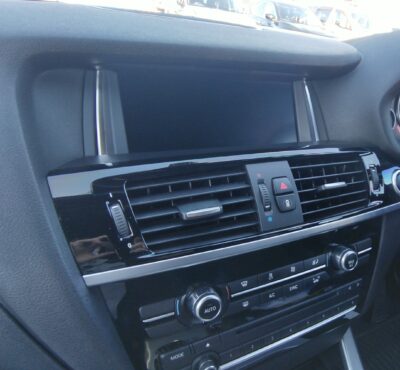
The factory monitor before the swap
It keeps everything the factory screen did, but the monitor itself has an Android OS, its own CPU, and memory — basically a tablet built into your dashboard.
That means Google Maps, YouTube, the Amazon app… all running right on your dash. Dream stuff for an older BMW.
A Much Bigger Screen
The factory monitor fits neatly, but at around 8 inches it looks tiny next to any modern car.
The one I installed is 12.3 inches — a huge difference!
And despite the size, it fits the dashboard surprisingly well.
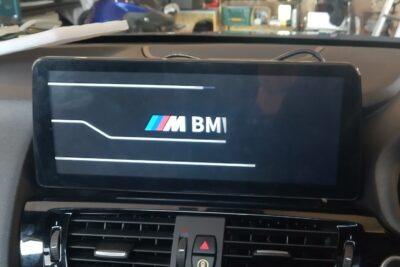
The 12.3-inch Android screen after installation
Built-In Connectivity
You can get it online via Wi-Fi from a mobile hotspot, or by inserting a SIM card directly.
The unit I bought has two SIM card slots.
USB Inputs
There are also two USB ports, so you can plug in a USB drive and play videos stored on it.
The monitor itself has 32/64/128 GB of internal storage depending on the version (mine is 64 GB), so you can store videos and apps directly on the unit too.
Always Up-to-Date Maps
Since navigation runs on Google Maps, the map data is always current.
Factory navigation on a car this age is missing newly opened roads, and traffic info isn’t real-time — online maps are a massive upgrade.
Voice guidance properly interrupts through the car speakers, too.
Besides Google Maps, any Android navigation app should work.
It Can Even Show Vehicle Data
Because the screen connects to the factory head unit, mine came with menus displaying live vehicle status.
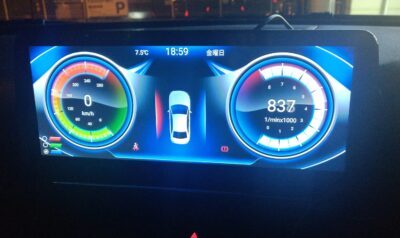
The vehicle status screen
The design is a bit questionable, but I was surprised how much data it picks up just by plugging it in:
- Vehicle speed
- Engine RPM
- Door open/close status
- Seatbelt warning
- Parking brake warning
- Light status
- Outside temperature
I wish I could reskin it with something nicer looking, but… it’s fine.
All Factory Functions Still Work
Everything that worked before still works.
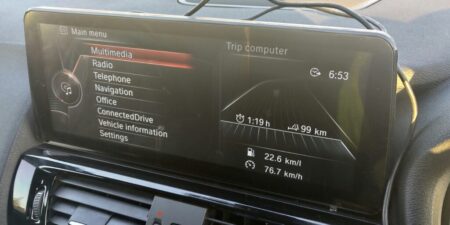
Just having the factory interface on a bigger screen is already worth a lot.
The backup camera also displays on this screen now, and it’s so much easier to see.
Surprisingly Affordable
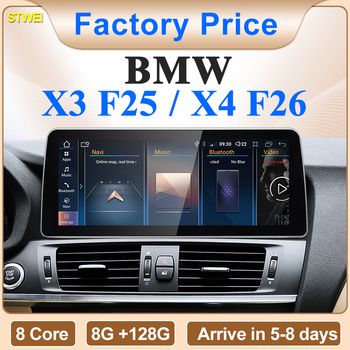
And here’s the kicker: depending on the spec, one of these big-screen units costs around ¥50,000 (approx. US$440 at the time).
The same type of 12.3-inch unit is still available on AliExpress — here’s a current listing (affiliate link):
Why I Pulled the Trigger
I installed this on an X3 with over 300,000 km on the clock because I felt it was still worth every yen, even this late in the car’s life.
I love cars but hate spending money on them. This was one of those purchases I could sneak past my wife and still justify if caught.
As it turned out, she noticed immediately after installation — and to my surprise said “Oh, this is nice!”
On our first long family trip after the install, YouTube on the big screen kept the kids happy the entire way.
Installation Was DIY
Googling turned up only a handful of installation examples for this swap.
There was one shop blog showing an install on an F25 X3, but detailed information was scarce.
Since these units come from overseas, I was slightly worried whether it would fit a right-hand-drive car — it did, no problem.
Choosing and buying the unit, and the DIY installation itself, are covered in detail in these follow-up posts:
- Choosing a 12.3-Inch Android Screen for the BMW X3 (F25) on AliExpress
- BMW X3 (F25) 12.3-Inch Android Screen: Step-by-Step DIY Installation
If you’re running an older BMW, an Android screen is seriously worth considering.
This article is also available in Japanese.